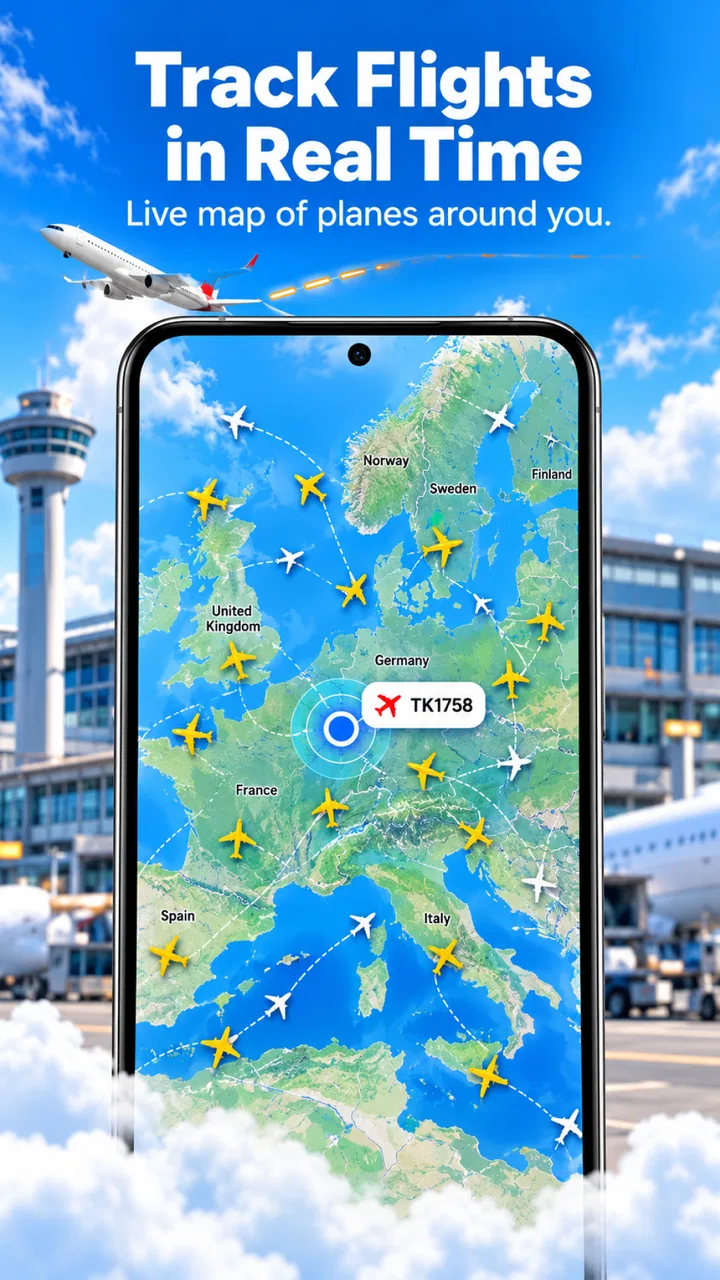
FlyTrack - Flight Tracker
- 4.7
- Rating
- 100.00K
- Installs
- Free
- Price

 Analysis by App-foxy
I tried FlyTrack as a travel and local app with one practical question in mind: can it make flight checking less stressful without forcing me to jump between several airport and airline pages? Its focus is clear. It brings live flight tracking, airport status information, and route details into one place, covering flights around the world. That makes it appealing when I am preparing for a trip, meeting someone at arrivals, or simply trying to understand where a flight is in its journey.
My overall impression is positive, but it is more useful as a focused flight companion than as a complete travel planner. It does not replace an airline account, a booking app, or an airport’s own service when I need check-in, baggage rules, gate instructions, or disruption handling. Where it helps most is the information gap between booking a flight and actually knowing what is happening on travel day.
Where the useful information can still feel hard to reach
The first point where I would expect users to get stuck is not necessarily a broken feature. It is the difference between knowing what you want to check and knowing how the app expects you to find it. A traveler may have a flight number, an airport name, a departure city, or only a route and approximate time. Those are not always equally convenient starting points.
You May Also Like

 Blood Strike: 2.5 Anniversary
Blood Strike’s Loadouts Turn Every Drop Into a Tactical Gamble
A close look at Blood Strike’s custom loadouts: how fast access to signature weapons reshapes its battle royale rhythm, rewards preparation, and narrows the gap between fights.

 Pandora - Music & Podcasts
Pandora’s Music Is Easy to Start, but Harder to Recover
Pandora’s strength is its low-effort path from a seed to a station. Its weak spot is how much confidence it asks you to place in connection, setup, and quiet recovery.

 8 Ball Pool
8 Ball Pool Is Built on Rivalries, Rematches, and Routine
A close look at the rivalries, rematches, shared routines, and unanswered safety questions that turn a quick pool match into a persistent mobile community.

 Samsung Music
Samsung Music’s Quiet Strength Is Playing What You Already Own
Its reach comes less from spectacle than from dependable access to a personal library. That simplicity is both the app’s strongest retention engine and its ceiling.

 AccuWeather: Weather Radar
AccuWeather Review: A Quick, Clear Forecast for Everyday Decisions
For everyday plans, the best forecast is the one you can understand quickly. AccuWeather makes rain timing, radar, and local conditions easy to act on, with a few trade-offs.

 Hill Climb Racing
Why Hill Climb Racing Still Turns Crashes Into One More Run
A tiny car, a bumpy hill and one more upgrade: Hill Climb Racing keeps resurfacing because its simple chaos makes every near-miss feel personal.
More From Our News Desk



For example, if I am collecting someone from the airport, I usually care about the current movement of the flight and the airport situation rather than the booking itself. If I am planning my own journey, I may want the route first and the live status second. The app’s combination of global routes, flight tracking, and airport status is useful in both situations, but the best result depends on beginning with the clearest piece of information I have.
I found it helpful to treat the app as a live information screen rather than as a replacement for the original booking source. The airline confirmation remains the place I would check for passenger-specific details. FlyTrack is better suited to answering questions such as whether a flight appears to be moving normally, whether the route is the one I expect, or whether the airport deserves closer attention before I leave home.
That distinction matters because a flight tracker can show the operational picture while leaving the personal travel requirements elsewhere. A status update does not automatically handle check-in, seat selection, baggage payment, visa documentation, or a change requested through an airline. I would keep the booking email or airline app available and use this app as a second view.
One particularly practical use is coordinating with another person. Instead of repeatedly asking a traveler to send updates, I can check the flight myself and adjust my departure time for the airport. That is more useful than it sounds, especially when the airport is far away or when arrival traffic makes an early trip inconvenient. It also avoids treating the scheduled landing time as a promise.
The route view has a different value. When I am comparing possible journeys, seeing the route information in a dedicated travel app can make the choice easier to understand than reading a compact line in a booking message. I can use it to confirm that I am looking at the correct airport pair, particularly when a city has more than one airport or when similar airport names appear in a search.
There is also a trade-off in the app’s broad scope. Global coverage sounds convenient, but a worldwide flight tool naturally has to serve many kinds of travelers and airports. A user who wants only one local airport may see more information than necessary. I would not judge that as a flaw by itself, but it means the app rewards a deliberate search habit rather than casual tapping.
What I would check before assuming a flight is delayed
When a displayed status looks surprising, I would first compare the flight number and date, then confirm the departure airport. A common mistake is checking a flight with the same number on the wrong day or confusing an airport serving the same city with another nearby airport. This is one of the simplest ways to avoid chasing a false delay.
I would also compare the app’s information with the airline or airport source before making an expensive decision. If I am deciding whether to leave for the airport, the app is a helpful signal. If I am deciding whether to buy a new ticket, book a hotel, or abandon a connection, I would want confirmation from the carrier as well.
The app is free to download, which makes that cautious approach easy to recommend. It also includes optional in-app purchases priced from $8.99 to $59.99 per item. I would pay attention to what an individual purchase unlocks before committing, especially if I only need occasional flight checks. For a frequent traveler, an upgrade may make more sense; for someone taking one trip, the free experience may be enough.
Setup checks that prevent avoidable frustration
FlyTrack comes from Mor Tosbaa Mobile and is listed for users aged Everyone. It runs on Android versions from 7.0 onward, so compatibility should be comfortable for many older devices as well as newer ones. Even with a compatible phone, I would begin by making sure the device has a reliable connection and enough time to load current travel information before testing the app at the airport.
My first setup check would be simple: install the app before the day of travel, open it at home, and practice looking up one known flight or route. This is not about learning a complicated system. It is about discovering whether I have the correct identifier and whether the airport names I use match the ones shown in the app. Finding that out in a quiet room is much better than doing it while carrying luggage.
I would keep the flight confirmation nearby during setup. The exact flight number is usually more dependable than a broad search for a city. If the app presents several similar choices, I would verify the airport and travel date rather than selecting the first familiar-looking result.
A second useful check is to look at the airport separately from the flight. The airport-status view can provide context that a flight-only search does not. If I am traveling through a busy hub, checking the departure airport before leaving gives me a broader picture of the journey. It can also help when the flight itself appears normal but the airport may be experiencing a separate issue.
I would not rely on the app as my only source while offline or in an area with unstable reception. Live tracking depends on current information reaching the device, so a weak connection can make an old view feel more current than it really is. Before leaving, I would note the flight number, airport, and scheduled time somewhere accessible, while keeping the original airline confirmation available.
Another setup habit I recommend is checking the app after a booking changes. If an airline has moved a traveler to another flight, the old flight may still be the one I instinctively search for. Updating the search target is more important than repeatedly refreshing the wrong record.
The current version is 1.2.0, and the app has a 4.4 average from around 186 ratings, with over 50 thousand installs. Those figures suggest a modest but established user base rather than a tool I would assume everyone at the airport already uses. I would still judge it by whether it fits my own workflow, not by popularity alone.
Because the app is categorized under Travel & Local, I see it as a practical utility rather than a full itinerary manager. That expectation makes the experience clearer. I would not install it expecting restaurant discovery, hotel management, or document storage. I would install it because I want a dedicated place to inspect flights, airports, and routes.
A setup routine I would use before travel day
- Start with the exact flight number when it is available, then verify the date and airport.
- Open the route view when I need to confirm the airports rather than relying on a city name alone.
- Check the airport status separately if the journey involves a large or unfamiliar airport.
- Keep the airline confirmation available for check-in, baggage, gate, and passenger-specific changes.
- Test the app while connected before relying on it during the journey.
This routine is deliberately unglamorous, but it removes the most common source of confusion: treating a general search as if it were already tied to my exact booking. A few seconds spent verifying the airport can save much more time later.
Recovering when a search or status does not look right
If a flight does not appear immediately, I would not begin by assuming the app is malfunctioning. I would check the spelling of the airport, remove unnecessary search detail, and try the flight number if I started with a route. If I began with a flight number, I would confirm that the airline and date are correct. This kind of narrowing is more effective than repeating the same search.
When a status seems frozen, I would refresh only after checking the connection. A live tracker is not the same as a messaging service that updates every second. Information can take time to change, and a stable status may simply mean there has been no new event. I would compare the time shown in the app with the current time and then consult the airline or airport source if the decision is urgent.
A useful recovery workflow is to move from specific to broad, then back to specific. I might begin with the flight number, inspect the route, open the departure airport, and return to the flight. This helps me determine whether the issue is a wrong flight record or a broader airport concern. It also gives me more context than repeatedly opening one status screen.
For someone waiting at arrivals, I would use the app in stages. Before leaving, I would check the flight and route. While traveling to the airport, I would check whether the status has changed. Near the airport, I would use the airport view for context, but I would still follow terminal signs and official announcements once inside. This avoids making one screen responsible for every part of the pickup.
For a traveler managing a connection, I would be careful not to treat route information as a guarantee of connection success. The app can help me see the status of the relevant flights, but it cannot know every personal factor affecting the transfer, such as walking time between terminals, security queues, or baggage arrangements. That is a key trade-off: broad operational visibility is useful, but it is not the same as a personalized connection assessment.
If I am checking a flight for another person, I would ask for the exact flight number rather than only the destination. This reduces ambiguity and avoids accidentally following a similarly routed service. If the person has been rebooked, I would discard the old search and create a new one from the updated confirmation.
There is also a sensible way to handle paid options. I would first use the free portion for an actual trip and identify the point where it stops meeting my needs. Only then would I consider an in-app purchase. The listed purchase range is wide, so I would avoid assuming that the most expensive option is automatically worthwhile. My decision would depend on how often I track flights and whether the extra value matters outside a single journey.
When refreshing is not the real solution
Repeated refreshing can create the impression that the app is unreliable when the underlying information has not changed. I prefer to check the flight identifier, date, airport, and connection first. If all four are correct, I compare the result with an official source and allow for a short delay in operational updates.
I would also avoid making a travel decision from a single unexpected label. A status is one piece of evidence. The route, airport context, airline message, and announcements at the terminal may all matter. FlyTrack is most valuable when it helps me assemble that picture quickly, not when I use it as an unquestionable authority.
When the app is not the cause of the problem
Flight information is affected by events outside any tracking app. Airlines can change schedules, airports can alter operations, and an aircraft can be delayed between updates. A mismatch between FlyTrack and a display board does not automatically mean that one side is broken. It may reflect different update timing or different operational sources.
That is why I would treat the app as an early-warning and orientation tool. If it shows that a flight may be late, I have a reason to investigate before leaving. If it shows a normal status but the airline has sent a direct disruption notice, I would follow the airline’s instruction because it applies to my booking.
The same principle applies to airport status. A general airport view can help me decide whether to allow more time, but it cannot replace the instructions for my terminal, gate, security area, or baggage claim. Once I am physically at the airport, official signs and staff become more relevant for immediate movement.
This is also where a dedicated airline app may be better. If my main concern is check-in, boarding passes, seat changes, baggage, or rebooking, the carrier’s own app is the stronger choice. If I am comparing flights from different airlines, monitoring someone else’s journey, or checking an airport without opening several airline accounts, FlyTrack is more convenient.
A general search engine can be faster for a one-off question, especially when I already know the flight number. However, a dedicated tracker gives the task a more focused home and makes repeated checking less scattered. I would choose FlyTrack when I expect to monitor more than one flight or want route and airport information together.
It is less suitable for travelers who want a complete trip organizer. Someone looking for hotel reservations, maps, restaurant recommendations, itinerary documents, or local attraction planning would need other tools. Installing it for those purposes would create the wrong expectations.
Privacy and battery concerns also deserve ordinary caution, even without assuming a specific app behavior. I would avoid leaving a live tracking screen open for hours unnecessarily, and I would use only the information needed for the trip. The practical goal is timely checking, not constant observation.
One of the less obvious strengths is that the app can reduce coordination work without requiring every person involved to share a booking account. A family member collecting a traveler, a colleague arranging a pickup, or a friend checking whether to leave for the airport can all work from the flight details. The limitation is that they still need the correct flight information and should not confuse public status with private booking updates.
My practical verdict after using it as a travel companion
I would recommend FlyTrack to travelers who want a straightforward way to follow flights, inspect worldwide routes, and check airport conditions from a dedicated Travel & Local app. Its best role is between the booking confirmation and the airport visit: it gives me a clearer operational view without pretending to manage the whole trip.
I especially like the combination of flight, airport, and route perspectives. Those views answer different questions, and moving between them can prevent the narrow thinking that comes from checking only a scheduled departure time. The app is also free to start, supports older Android devices from version 7.0, and has an Everyone age rating, which keeps the basic barrier to entry low.
I would not recommend relying on it alone for expensive or time-critical decisions. The airline remains essential for booking-specific actions, while the airport remains essential for terminal instructions and immediate announcements. The app’s information is most useful when I use it to decide what to verify next, not when I treat it as the only authority.
My advice is to install it before the trip, test a known flight, confirm the airport and date, and keep the original booking source beside it. If you regularly meet people at airports or follow flights operated by different airlines, that workflow can save real effort. If you only need a boarding pass or a rebooking button, the airline’s own app will probably serve you better.
In the end, FlyTrack is strongest as a calm second screen for travel decisions. It does not remove every uncertainty around flying, and it cannot control delays or airport changes. What it can do is organize the information I most often need when a journey is in motion. For that specific job, I found it practical, easy to justify, and worth trying before deciding whether any optional purchase adds enough value for my travel habits.
Mor Tosbaa Mobile has kept the idea focused rather than turning it into an overloaded travel suite. That focus is the main reason I would keep it installed during a trip. I would simply pair it with the airline and airport sources, verify surprising updates, and use its route and status views as complementary tools rather than replacements.
FAQs for FlyTrack - Flight Tracker
01What is FlyTrack - Flight Tracker used for?
FlyTrack - Flight Tracker is designed to help travelers monitor flight information in one place. After entering a flight number or route, users can typically view departure and arrival details, scheduled times, airport information, and status updates. It can be useful for checking whether a flight is on time, delayed, boarding, or completed before leaving for the airport or meeting someone.
02Does FlyTrack provide real-time flight status and delay notifications?
The app is intended to provide updated flight information, including changes to schedules and possible delays, but the accuracy and speed of updates may depend on the data source and internet connection. If notifications are available on your device, you may need to enable them in the app and in your phone’s system settings. For important trips, confirm details with the airline or airport as well.
03Can I track flights without creating an account or paying?
FlyTrack’s access requirements may vary depending on the version installed, operating system, and available features. Basic flight searches may be offered without an account, while saved trips, alerts, or additional tracking tools could require registration or a paid option. Before downloading, review the app’s current store listing, subscription terms, and in-app purchase information to avoid unexpected charges.
04Does FlyTrack work offline or require an internet connection?
Flight tracking generally depends on current data from online servers, so an internet connection is normally required to search for flights and receive the latest status updates. Previously viewed information may remain visible temporarily, but it should not be considered current when offline. Travelers should refresh the app whenever they regain Wi-Fi or mobile data, especially before heading to the airport.
05Is FlyTrack - Flight Tracker reliable for important travel decisions?
FlyTrack can be convenient for monitoring flights, but it should be treated as a supplementary travel tool rather than the only source of information. Airline schedules, gate assignments, cancellations, and boarding instructions can change quickly. Check the airline’s official app, website, email, or airport displays for final confirmation. Also verify permissions, privacy practices, supported airports, and update frequency before relying on the app.
Pros
- Live flight status updates help you monitor delays and gate changes.
- Clean interface makes essential flight details quick to find.
- Useful airport and airline information is available in one place.
- Flight tracking can help friends and family follow your journey.
- Supports planning by displaying departure
- arrival
- and route details.
Cons
- Some advanced tracking features may require a paid subscription.
- Notifications can occasionally arrive late during rapidly changing flights.
- Accuracy depends on airline and airport data being updated promptly.
- Ad-supported areas may feel distracting during regular use.
- Battery and data usage can increase when tracking flights continuously.

FlyTrack - Flight Tracker
Gallery